The keyword ranking report that reads itself.
«Which keywords moved, and did the movement bring clicks?» is the question every ranking report exists to answer, and the one most dashboards leave to the reader.





4.97 from 100 reviews in 27 countries: read them
What a keyword ranking report is
A keyword ranking report in Data Studio (formerly Looker Studio) shows where a site appears in Google for the queries that matter to it, and how those positions moved over the period. The reliable version reads the positions from Google Search Console, the only source that lists every query a site was shown for, and puts impressions, clicks and CTR next to each one, because a rank without its traffic is a vanity number.
This template is that report, already built on Data Studio and connected to your own Search Console property. One page lists the queries with their average position and clicks, one separates brand from generic searches, one ranks the pages rather than the keywords, and a timeline shows the movement month by month. Smart Interpretations writes the reading of the numbers inside the report, so the page the client opens already says what changed.
Who opens it
SEO agencies
One copy per client, each reading that client's Search Console. The monthly ranking report becomes a link that is current the morning of the meeting.
In-house SEO teams
A shared view of positions and clicks that the rest of the company can open without a Search Console login or a tutorial.
Freelancers and consultants
A finished, branded deliverable at a one-time price, instead of a rank tracker subscription per client.
A keyword ranking report, live: 19 pages on real data
The template itself, embedded from Looker Studio on demo data. Click through it here, or pick a page below. The orange field is where your own property goes once the copy is yours.
19 pages. These 12 do the work of a keyword ranking report.
Each one photographed from the live template, with what it is for and the fields it reads. Every field links to its definition; every page opens in the live report above.
- Page 1 of 19
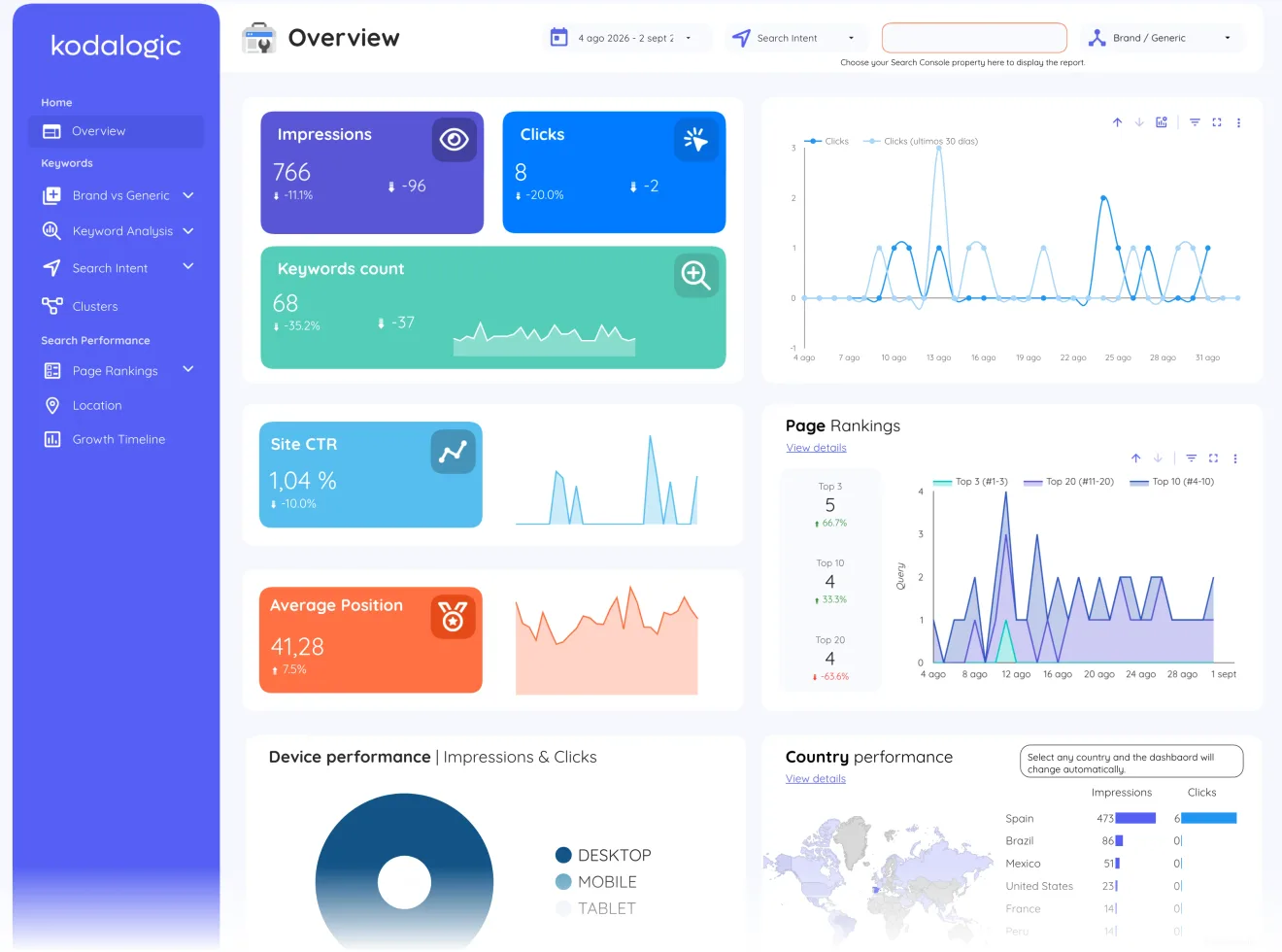
Overview
The five search numbers with their device and country cuts, assembled on one screen instead of across six Search Console tabs. The executive answer before anything gets segmented.
Reads: Impressions · Clicks · Keywords count · Site CTR · Average Position
- Page 2 of 19
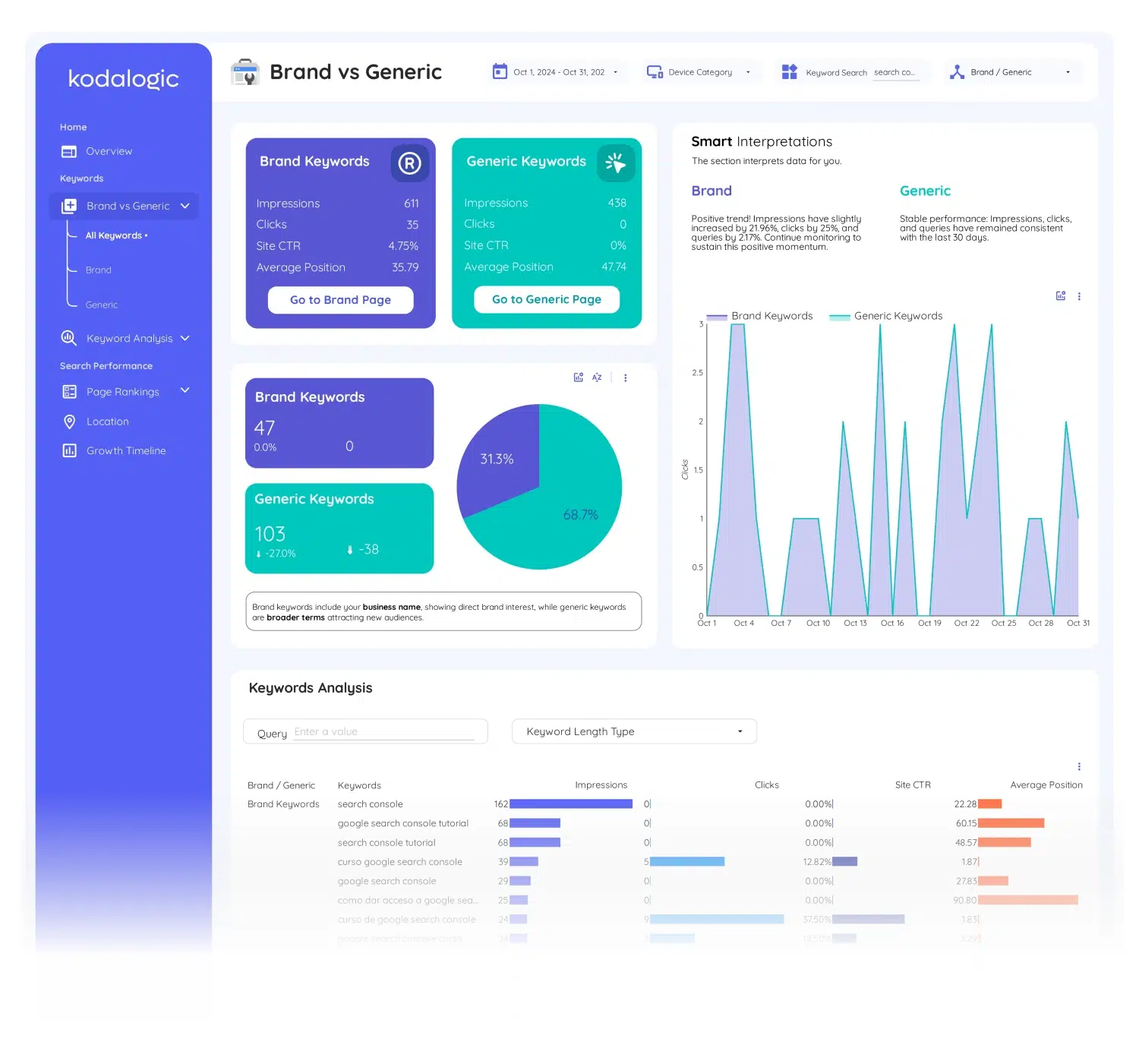
Brand vs generic
Queries that include your name split from queries that do not, each side with its own impressions, clicks, CTR and position, and Smart Interpretations writing the trend underneath. Brand traffic measures recognition; generic traffic is where SEO investment moves the needle.
Reads: Impressions · Clicks · Site CTR · Average Position · Brand Keywords
- Page 3 of 19
Brand keywords
The branded side on its own: every query that carries your name, its volume over time and where it ranks, the visibility report for how effectively the brand reaches people already looking for it.
Reads: Keywords · Impressions · Clicks · Average Position · Site CTR
- Page 5 of 19
Keyword analysis
Every query with impressions, clicks, CTR and average position in one searchable table, plus keyword-length grouping, the working page where individual rankings get investigated.
Reads: Impressions · Clicks · Site CTR · Average Position · Short Tail
- Page 6 of 19
Short tail keywords
Head terms of one to three words, isolated with their own volume, clicks and positions. High demand, hard to win: this page says whether the effort spent chasing them is paying.
Reads: Keywords · Impressions · Clicks · Average Position · Site CTR
- Page 7 of 19
Long tail keywords
Queries of four or more words: lower volume, clearer intent, better conversion. The page that shows whether specific questions are earning the clicks your head terms cannot.
Reads: Keywords · Impressions · Clicks · Average Position · Site CTR
- Page 8 of 19
Search intent
Every keyword classified as informational, navigational, commercial or transactional on every refresh. A transactional query stuck at position 12 is a revenue problem; the same position on an informational query may be fine. This page shows the difference.
Reads: Informational · Commercial · Transactional · Navigational · Site CTR
- Page 13 of 19
Keyword clusters
Queries grouped into topics from seed terms you define, with anything unmatched held in Uncategorised for review. Topic-level trends move before any single ranking does: when a cluster gains ground for four weeks, that content strategy is working.
Reads: Keywords · Impressions · Clicks · Site CTR · Average Position
- Page 14 of 19
Page rankings
The four position buckets with the risers and fallers listed beside them. A keyword climbing out of page two is a real win that an average-position number would have hidden entirely.
Reads: Top 3 · Top 10 · Top 20 · Rest · Average Position Last Quarter
- Page 15 of 19
First page keywords
What already sits on page one and what is about to break in: the positions 4 to 10 group is your highest-leverage SEO investment, where moving from 7 to 4 can triple the clicks.
Reads: Keywords · Impressions · Clicks · Average Position · Site CTR
- Page 18 of 19
Location
Impressions, clicks, CTR and position by country, with the top performing market surfaced and the whole dashboard filterable by any location. A keyword at position 4 in one market can sit at 22 in another; this page is where those gaps show.
Reads: Impressions · Clicks · CTR · Average Position · Impression Share
- Page 19 of 19
Growth timeline
The long view: total performance over twelve months with your best day, week, month and quarter picked out automatically, the page a renewal conversation opens with.
Reads: Average Position · Impressions · Clicks · Site CTR · Queries
The sections a keyword ranking report needs, and the questions each one answers
Positions with their traffic
Every tracked query with its average position, impressions, clicks and CTR: the search engine ranking report reading that ties movement to actual visits, not just rank numbers.
- Which keywords moved this month, and did the movement bring clicks?
- Which high-impression queries have a CTR problem rather than a ranking problem?
Brand vs generic split
Searches for your own name reported apart from open queries, so brand growth never masks a generic decline.
- Is our generic visibility growing, or is brand searches doing all the work?
Ranking distribution
How many keywords sit in the top 3, positions 4–10 and beyond: the shape that changes before total traffic does.
- How many keywords sit in the top 3, and how is that shape changing?
Written analysis
Smart Interpretations turns the connected Search Console data into plain-language findings inside the report.
- What changed, in plain words, since the last report?
The template, in numbers
- Best for...
- SEO teams focused on organic growth.
- Traffic Overview
- Organic traffic & performance.
- Conversion Tracking
- Tracks organic search conversions.
- Audience Insights
- Search behavior & intent.
- Keyword Performance
- Keyword rankings & performance.
- Search Engine Optimization
- Actionable SEO insights.
- Acquisition Channels
- Organic traffic by search engine.
- Geographic Data
- Regional insights from Search Console.
- User Engagement Metrics
- CTR and clicks from Search Console.
- Setup Time
- Under 1 minute.
Which template to buy for a keyword ranking report
Built for this report
Google Search Console Dashboard for Data Studio
The only Data Studio SEO template that reads your Search Console data and writes the analysis for you. Rankings, CTR gaps, brand vs generic — explained automatically.
$129
One-time payment, lifetime updates, unlimited copiesWhen another one fits better
When the client also asks what the visitors did after the click: it adds GA4 behaviour and conversions behind the same rankings.
When paid search runs alongside organic and the report has to show both on one link.
- Compare all six side by side
What buyers say about working with kodalogic
- ★★★★★
carrieloranger, United States of AmericaHe was very knowledgeable with Data Studio/Looker and helped me so much. When it was time to make changes, he was very responsive and accommodating. He is a happy and hard-working person and I can tell that he enjoys his work and helping his clients very much. I would say he went above and beyond in terms of being responsive and accommodating to all of the requested edits. I will definitely use him again and highly recommend him to anyone who needs expertise with reporting dashboards.
- ★★★★★
atd144, NetherlandsI am extremely satisfied with the service I received. The work performed was exceptionally professional and the freelancer proved to be highly committed and willing to meet all of our needs. Communication was fluid and effective at all times, which made the process even more pleasant. I would definitely recommend Kodalogic for this type of work and look forward to working with him again in the future.
- ★★★★★
heymindbyte, GermanyI recently worked with Kodalogic on a Google Looker Studio Dashboard, and the experience was fantastic. He designed an impressive dashboard and skillfully fixed errors in an older one. His communication was clear, and his expertise was evident throughout the project. I'm absolutely satisfied with his work and will definitely be collaborating with him again. Highly recommended!
All 100 reviews, with the country and date of each one.
Read the deep dive
- What is Smart Interpretations? →
The deep dive on the feature no other public dashboard has: what it reads, what it writes, and examples of the analysis it produces on live data.
- Search intent and keyword clusters, explained →
How every query gets classified into informational, navigational, commercial or transactional, and how the clustering rules are defined and edited.
- Brand, length and position buckets: why each one matters →
What to do when brand and generic diverge, when long tail outperforms head terms, or when keywords move between position buckets.
- SEO insights with smart dashboards →
Section by section, what a proper Looker Studio SEO dashboard should contain and the decision each one supports.
- Track keyword rankings with Search Console →
The reporting problem this template solves, and which keyword categories deserve attention first.
- How to connect Search Console to Looker Studio →
The connection itself, step by step, if you are setting up the property for the first time.
- Schedule the dashboard for email delivery →
How to have Looker Studio send this report by itself, weekly or monthly, with the live data of the moment it goes out.
- Put your client logo and colors on the report →
The three-click white-label pass: duplicate the base report, swap the data source, drop in the client brand.
- Best Looker Studio templates for 2026 →
The full comparison of the six dashboards we build, what each one covers and which situation each one fits.
How it connects
The template connects to Search Console with Google's native Data Studio connector; free, no third-party service in between. You copy the report into your own Data Studio, authorise your property, and the ranking data flows in; the shared link then shows current positions every time it is opened, and a scheduled email can send a monthly snapshot on top.
Setup guides that apply
- Connect GA4, Search Console or Google Ads to your Data Studio template · Connect your Google Analytics 4, Google Search Console or Google Ads data to your copy of the Data Studio template in minutes, with Google’s native connectors and no third-party service.
- Share a Data Studio report with clients and schedule email delivery · Share your Data Studio report template with clients through a live viewer link, or schedule a PDF snapshot by email every week or month; both are built into Data Studio.
- No data or access error in a Data Studio report · Why a page of the Data Studio template comes up empty or shows an access error after connecting Google Analytics 4, Search Console or Google Ads, and the fix for each cause.
The team agencies hire to build their dashboards
Six dashboards, one team, one design system.
- 4.97 / 5
across 100 verified reviews, 94 of them five stars, from clients in 27 countries who hired us to build their Looker Studio dashboards
Read every review - 85 fields
documented across Google Search Console, Google Analytics 4 and Google Ads, one definition each, so you know what every number in the report means
Open the Google Search Console reference - Lifetime
updates and a setup guide with every dashboard, from the same team that built it
Docs, delivery and setup - 329,000+
reads on our Looker Studio guides, written by the people who build the dashboards
Read the guides
Before you ask
- What data source does it need?
- Google Search Console. You connect your own property; the template reads it directly, so the report is always current.
- Is this different from the Search Console dashboard?
- It is the same product: this page describes the keyword ranking use case it was built for.
- How far back does the ranking history go?
- Search Console keeps sixteen months of data, and the report reads all of it. From the day you connect, the timeline shows the last sixteen months, not just the period since purchase.
- Does it track keywords I choose, like a rank tracker?
- It reports every query Google showed the site for, which is wider than a chosen list. To follow a fixed set, filter the keyword pages by those terms; the filter is saved with the report.
- Can the client see it without a Search Console login?
- Yes. You share a viewer link from Data Studio and the report reads the property with your credentials. The client sees the pages, never the property.
The terms this report uses
- Keyword ranking
Keyword ranking is the position a page occupies in the search results for a specific query; position 1 is the top organic result.
- Average position
Average position, also called keyword position, is the mean ranking of a site for a query or page across all the impressions it received in a period, as reported by Google Search Console.
- Impressions
An impression is counted each time a link to a site appears in a search results page a user views, whether or not it is clicked.
- CTR (click-through rate)
CTR is clicks divided by impressions, expressed as a percentage: the share of times a listing was shown that ended in a click.
- Brand vs generic keywords
Brand keywords are searches that include a company’s own name; generic keywords are everything else.
- Unique keywords
Unique keywords are the distinct search queries for which a site received at least one impression in a period, each counted once regardless of how many times it appeared.
- Long-tail keywords
Long-tail keywords are longer, more specific search queries, usually four words or more, that each have low search volume but together make up most of a site's search traffic.
Keyword Ranking Report, built. Yours the same afternoon.
Copy the template into your own Data Studio, connect your property, put your brand on it. The report your client opens on Monday is the one you saw in the demo today.
$129
One-time payment. No taxes charged.
94 of 100 buyers gave it five stars, from 27 countries. Every review, with its date.